
MiX Launcher 🔥 for Mi Launcher +7.3 - Google Play
You'll be able to see results in few seconds.
Publisher Description
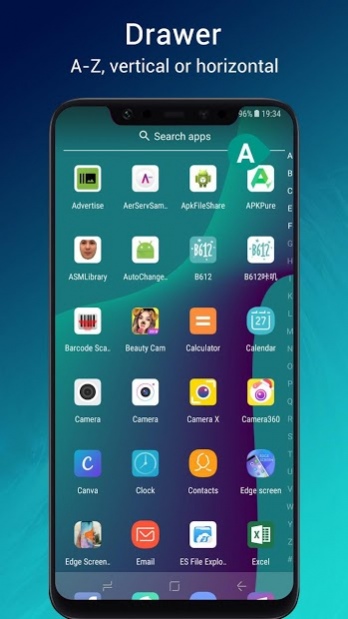


MiX Launcher is inspired by Mi 11 Launcher, adding many useful features, such as all apps drawer, gestures, hide app, gesture quick ball, etc.; MiX Launcher make your phone look like latest cool Mi 11 phone.
👍Just get and try MiX Launcher, you will like it!
Notice:
- Android™ is a registered trademark of Google, Inc.
- MiX Launcher is inspired by Mi 11 Launcher, but please be noted that this is NOT official MIUI launcher product, our team have no affiliation with Xiaomi Inc.
❤️
Mi X Launcher features:
> Mi X Launcher support 🎨
Theme
, it has more than 1000+ cool themes, and build-in Mi 11 theme, Android™ P theme, Round icon theme
> Mi X Launcher support 🎨
Icon Pack
, it support most of the icon pack in Google Play Store
> It has
Apps Drawer
, and you can choose vertical mode or horizontal mode
> Mi X Launcher can run smoothly on all Android 5.0+ devices
> Mi X Launcher support
hide unused or private apps
, and lock🔐 hidden apps
> Mi X Launcher support
notification dots
> Mi X Launcher support ✌️
gestures
, such as swipe down/up, pinch in/out, double tap, two fingers swipe down/up
> ✌️Gesture ball(quick ball) function, you can enable it in Launcher Setting, one-handed operation is more convenient
> ✌️Gesture feature: swipe up for all app drawer, swipe down back to desktop
> ✌️Full screen gesture: Swipe left or right from the edge of the screen will Go back; Swipe up from the bottom of the screen will Go to Home screen; Swipe up from the bottom of the screen and pause will Open Recent
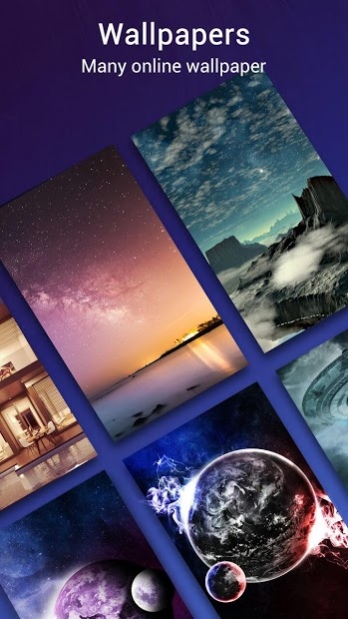
> Many beautiful online wallpapers for your choice
> Many options, you can change grid size, icon size, label size and color, etc
> You can lock desktop to avoid being messed up by kids
> Drawer background option: light, dark, blur, transparent or custom picture
> Dock background option: rectangle, rounded, arc, platform or none
> 🔍Search bar support various look, you have the choice
> Wallpaper scrolling or not option
> Edit individual app icon and app label
> MiX Launcher has many transition effect for desktop screen
> You may change font in MiX launcher
> You may change folder preview style
> There is recent apps section in drawer
Notice:
"This app uses Accessibility services."
Full Screen Display and Quick Ball gestures feature uses Accessibility services to allow users of all abilities to use phone more conveniently.
These features are disabled by default, before you can enable them, you will be asked to permit Accessibility with very clear explanation.
⭐⭐⭐⭐⭐ We are trying best to make Mi X launcher better, please rate us if you like MiX Launcher, thanks a lot!
About MiX Launcher 🔥 for Mi Launcher +
The company that develops MiX Launcher 🔥 for Mi Launcher + is Beauty Apps Studio. The latest version released by its developer is 7.3.
To install MiX Launcher 🔥 for Mi Launcher + on your Android device, just click the green Continue To App button above to start the installation process. The app is listed on our website since 2020-01-10 and was downloaded 0 times. We have already checked if the download link is safe, however for your own protection we recommend that you scan the downloaded app with your antivirus. Your antivirus may detect the MiX Launcher 🔥 for Mi Launcher + as malware if the download link to launcher.mi.launcher is broken.
How to install MiX Launcher 🔥 for Mi Launcher + on your Android device:
- Click on the Continue To App button on our website. This will redirect you to Google Play.
- Once the MiX Launcher 🔥 for Mi Launcher + is shown in the Google Play listing of your Android device, you can start its download and installation. Tap on the Install button located below the search bar and to the right of the app icon.
- A pop-up window with the permissions required by MiX Launcher 🔥 for Mi Launcher + will be shown. Click on Accept to continue the process.
- MiX Launcher 🔥 for Mi Launcher + will be downloaded onto your device, displaying a progress. Once the download completes, the installation will start and you'll get a notification after the installation is finished.
Program Details
System requirements
Download information
Pricing
Version History
version 7.3
posted on 2020-01-10
v7.3
1. Optimize icon pack support
2. Remove the shadow at the top of the screen
3. Fixed crash bugs
version 7.3
posted on 2020-01-10
v7.3
1. Optimize icon pack support
2. Remove the shadow at the top of the screen
3. Fixed crash bugs
version 7.1
posted on 2020-01-04
v7.1
1. Added more cool Live wallpapers and 3D parallax wallpapers
2. Optimized app drawer
3. Fixed bugs
version 7.0
posted on 2019-12-07
v7.0
1. Remove news feed in side-page
2. Optimize launcher color modes to: Dark, Light and Auto color according wallpaper
3. Optimize Hide Apps
4. Optimized the App Stats
5. Calendar support display current day
6. Fix some bugs
version 6.7
posted on 2019-11-29
v6.7
1. Optimize folder layout
2. Optimize wallpaper blur effect while swiping desktop
3. Optimize default icons
4. Fix unread notifier duplicated in Moto devices
version 6.6
posted on 2019-11-16
v6.6
1. Optimize icon shape for Huawei devices
2. Add wallpaper blur effect while swiping desktop
3. Fix unread badge bug
version 6.5
posted on 2019-11-09
v6.5
1. Add an option to set default homepage
2. Click page-indicator in drawer will show A-Z quick search bar
3. Optimized novice guide
4. Fixed bugs of quick ball
5. Fixed crash bugs
version 6.4
posted on 2019-11-01
v6.4
1. Optimize folder layout and animation
2. Fix can not enter theme store
3. Optimized weather widget
4. Fixed round theme can not be applied
5. Fixed bugs
version 6.2
posted on 2019-10-22
v6.2
1. Optimized fingerprint unlock
2. Optimized move desktop icons to dock
3. Add option to hide "hide apps" icon, you can swipe up with two fingers on desktop to open hide apps
4. Fixed ANR bug in dark/white wallpaper detection
version 6.1
posted on 2019-09-28
v6.1
1. Optimized default theme
2. Optimized rating
3. Fixed bugs
Disclaimer
Official Google Play Link
We do not host MiX Launcher 🔥 for Mi Launcher + on our servers. We did not scan it for viruses, adware, spyware or other type of malware. This app is hosted by Google and passed their terms and conditions to be listed there. We recommend caution when installing it.
The Google Play link for MiX Launcher 🔥 for Mi Launcher + is provided to you by apps112.com without any warranties, representations or guarantees of any kind, so access it at your own risk.
If you have questions regarding this particular app contact the publisher directly. For questions about the functionalities of apps112.com contact us.
